Direct answer: For your first WARDOGS match, launch the released Steam game, join the same server and faction as your friends, buy a loadout you can afford to replace, and help your team reach the Control Zone. This beginner checklist uses the official rules and Season 2 / Update 0.2.0, released October 15, 2026.
Before your first deployment
- Check the PC requirements and input limitations. The Steam version is Early Access, so performance and interfaces can change.
- Open the purchased WARDOGS entry in your Steam library. An old Playtest entry is a separate entitlement; see access troubleshooting if you cannot launch the released game.
- Finish any Steam update. Agree with friends on a server and faction before deploying. A squad, a faction and a Steam party are different groups; use the squad guide.
- Choose a nearby server whose ping requirements you can meet. Season 2 adds region-based limits on official servers; repeated high latency can lead to a kick.
Your first-match checklist
- Select a teamChoose Valkyra, Lonestar or Manticore. Selecting a team makes you active in the match; coordinate this choice with friends.
- Buy for one jobPurchase a manageable combat, medical, building or transport loadout. The published starting cash is $10,000; replacement costs matter.
- Check the objectiveThe goal is the current Control Zone, not clearing the entire map. Arrange transport or a route that helps you reach it.
- Keep teammates contributingObjective presence, revives and friendly transport are published teamplay rewards. Choose a useful task rather than duplicating an expensive vehicle.
- Review before buying againInspect the vendor's Rebuy Last Loadout selection and change items before purchasing. Avoid automatically repeating an unaffordable setup.
These are source-based planning steps, not a recreation of every menu or a tested optimal loadout. The official notes document the rebuy interaction but do not provide a complete keyboard layout.
Understand what wins a match
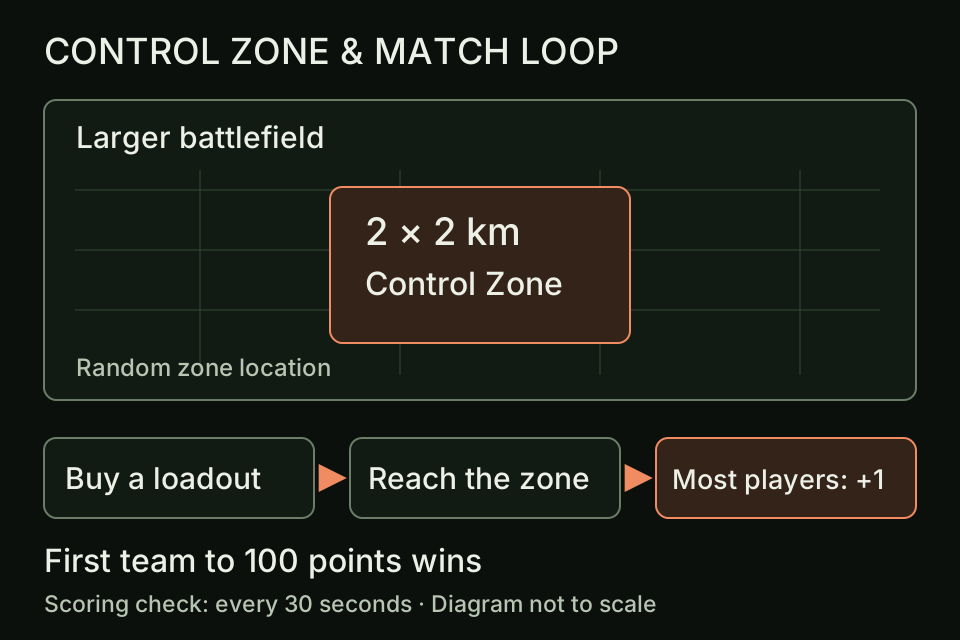
Up to 100 players are divided into three teams. Every 30 seconds, the team with the most players inside the Control Zone receives a point; the first team to 100 points wins. A kill can help clear a route, but the scoring rule counts players present in the objective. The gameplay guide includes a worked scoring example.
The publisher describes a 256 km² battlefield and a randomized 2×2 km scoring zone. These are different areas. Travelling around the whole map without helping the active objective can leave your team short of scoring players.
Choose a first role and budget
A lower-cost infantry setup keeps replacement decisions simple. If you want to revive teammates, the developer FAQ names bandages and medkits as purchasable medical items. Building uses purchased construction items. A bigger backpack permits combining jobs, but the FAQ also describes weight and inventory management, so buying more is not automatically better.
Before purchasing, ask whether you can fund another deployment if this one fails. Actual item prices and rewards vary by patch. Use the vendor's displayed totals rather than a guessed “best” build; the cash example shows the arithmetic without inventing game prices.
Season 2 details that affect beginners
- Squad intent: leaders can publish an intent that appears on the squad list. Read it before joining; invitations now queue.
- Changing teams: when a team is more than 10 points ahead, additional restrictions apply. Coordinate your faction first; the faction guide explains the published restrictions.
- Faction bonus correction: Season 2 introduced Lonestar cash and XP rewards on October 15; the developer removed the bonus in the October 16 backend update. Do not rely on it when choosing a team or planning income.
- Rebuy: the vendor shows the previous loadout for editing before purchase. This is an opportunity to reduce a costly setup.
Common first-match mistakes
Do not mistake the 100-player match cap for a party cap, assume a beta invitation owns the released game, or use old controller mappings after an update. Do not treat a planned feature as already available: the Season 2 notes explicitly say the Wager Vendor is not available at the season's launch.
60-second reference
- Developer / publisher
- BULKHEAD / Team17
- Release stage
- Steam Early Access · September 10, 2026
- Rule basis
- Season 2 / 0.2.0 · October 15; Lonestar bonus corrected October 16
- Objective
- Three teams · first to 100 points
- Starting cash
- $10,000; cash persists between matches
- Next step
- Pick a role, reach the zone, review your replacement cost
Source record
- Steam store — release, economy, objectives and system requirements.
- Pinned developer FAQ — scoring, teams, roles and platform statements.
- Season 2 patch notes — changes shipped with the October 15 Update 0.2.0.
- October 16 backend correction — removal of the Lonestar cash and XP bonus.
The original rule and source review was October 16, 2026. On October 29, 2026, we checked the backend correction and revised the faction-bonus advice and reference panel; this was not a new review of every rule. This guide uses published sources, with planning advice labelled separately from hands-on testing. Later patches may change the details.